Zoom is more user-friendly (although the sound quality is not great for music)… but expensive… so I’m moving to Discord. Sorry! Hopefully, the sound quality is better (crossed fingers). Please do email me feedback and any suggestions or solutions: oxfordslowsession2014@gmail.com
You can use Discord on the web, but you will still need to register a username and log in…
So go to: https://discord.com/
You can choose whether to download it to your machine or stay on it via a browser. And your username can be whatever you like (I think). Ideally, if possible, it is a good idea to have two gadgets for the session: one to listen to the session (using Discord), and another to have access to the Slow Session website for the music (if you want to read music). Alternatively you can use the link to print out all the music, although I think turning pages is slower than clicking tabs. However, you will be muted (ie you will hear the session, but we won’t hear you, so you can happily play along however you like!
I hope these give you some guidance on how to use Discord. Please do give it a try and let me know.


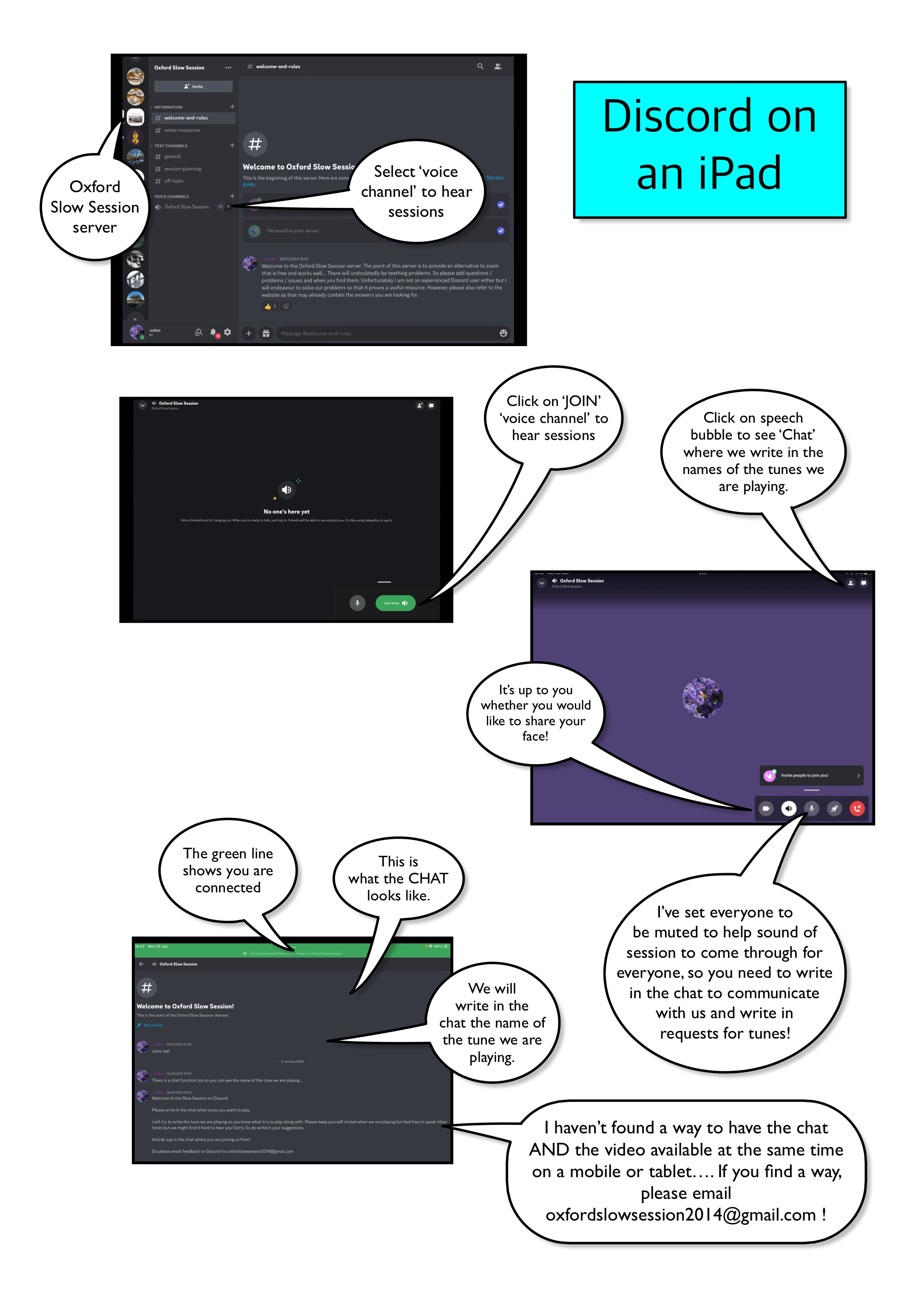
Good luck!
The Discord Oxford Slow Session server can be found at: https://discord.gg/Y3jBw376mH
And you need to click on the voice channel (see images above) to hear the session (when it is in progress). https://discord.gg/Y3jBw376mH
 Oxford Slow Session